
Thermostat Not Working? Fast Fixes and When to Call a Pro
Most thermostat failures are power-related. Before you assume the worst, try fresh batteries, check the HVAC breaker, and confirm the thermostat is set to the right mode and setpoint. Those three checks solve a surprising share of “thermostat not working” calls in under ten minutes combined.
Here’s the order that gets you an answer fastest:
Mode and setpoint (30 seconds): Confirm it’s set to Heat or Cool, not Off, and the setpoint is at least 3 degrees away from the current room temperature.
Batteries (2 minutes): Swap in fresh AA or AAA alkaline batteries, even if the old ones “look fine.”
Breaker (5 minutes): Find your HVAC breaker in the electrical panel and reset it firmly to off, then on.
If none of those bring the screen or the system back to life, you’re dealing with something on the wiring or equipment side, which the sections below walk through step by step.
Pro Tip: If you see scorched wiring, melted plastic near the thermostat base, or smell anything burning, stop immediately and call a licensed technician. Don’t reset a breaker that keeps tripping.
Key Takeaways
Most thermostat failures trace back to power, either dead batteries, a tripped breaker, or a blown control-board fuse, and a fix rarely requires a full replacement.
Point | Details |
Try power fixes first | Replace batteries, reset the HVAC breaker, and confirm the mode and setpoint before anything else. |
Match the symptom to the cause | A blank screen points to power loss; a lit screen with no equipment response points to wiring or HVAC-side faults. |
Respect the compressor delay | Wait 5 to 10 minutes after “Cool On” appears before assuming the equipment failed. |
Know your stop point | Exposed wiring, repeated breaker trips, or burning smells mean it’s time to call a technician, not keep troubleshooting. |
Get diagnosis before replacement | Texas Comfort Crew tests voltage and equipment first and repairs whenever that’s the honest fix, rather than defaulting to a new unit. |
Table of Contents
How to Troubleshoot a Thermostat Not Working Step by Step
Start by figuring out which symptom you’re dealing with: a completely blank screen, a screen that’s lit but the furnace or AC never kicks on, a temperature reading that seems wrong, or a system that short cycles on and off every few minutes. Each points down a different path, but the first few checks are the same no matter what you’re seeing.
Check the mode and setpoint. A thermostat accidentally bumped to “Off,” or a setpoint sitting one degree from room temperature, looks exactly like a broken unit.
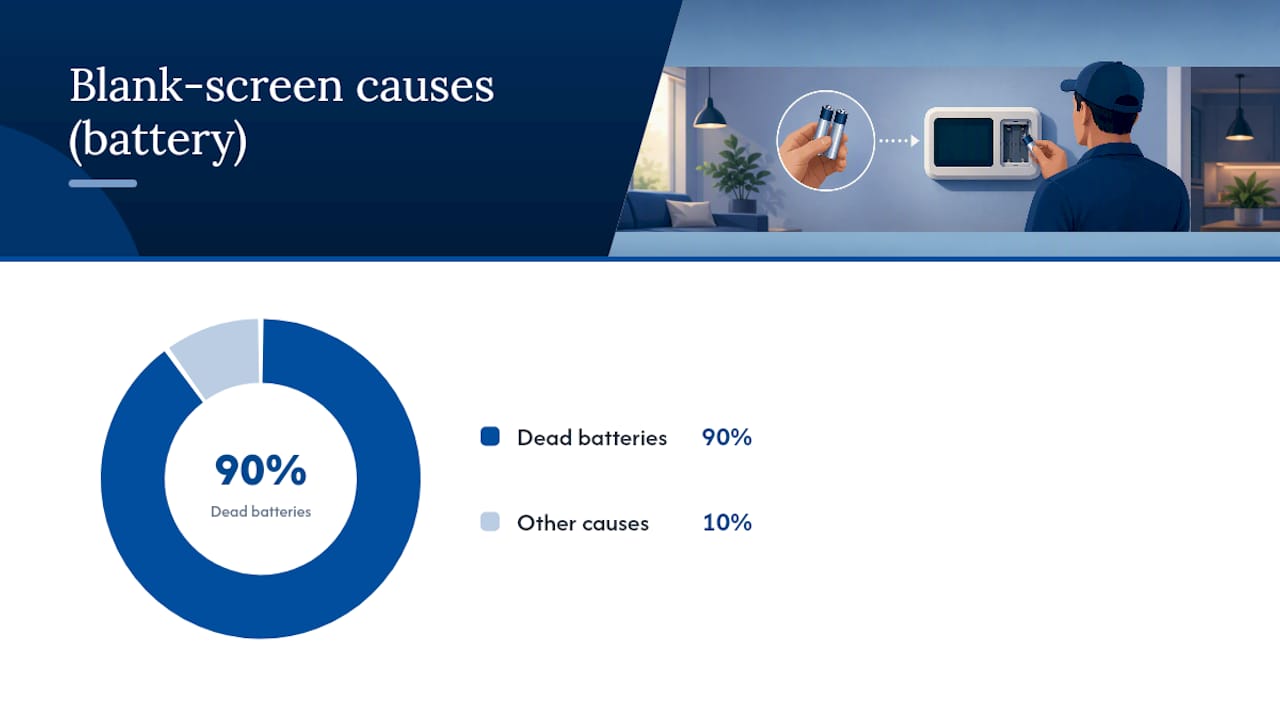
Replace the batteries. This single step resolves a large share of blank-screen calls, and it costs you two minutes.
Check the HVAC breaker. Most homes run the furnace or air handler on a dedicated breaker separate from the rest of the house. Flip it fully off, wait ten seconds, then back on.
Check the furnace or air handler service switch and door. Many units have a light switch style toggle near the unit, plus a safety switch built into the access door. If the door isn’t seated, the switch stays open and cuts power.
Inspect the air filter and condensate float. A filter clogged with dust or a tripped condensate float can shut the whole system down and make the thermostat look like the culprit.
The Department of Energy lists dead batteries, incorrect mode settings, tripped breakers, and dirty filters as the most common reasons a thermostat stops responding, and that lines up with what shows up on service calls across most HVAC systems.
Budget some time for steps one through four. If you’ve gone through all five and the thermostat is still blank or unresponsive, that’s your stop point. Continuing past this usually means opening a panel or testing voltage, which is where DIY troubleshooting should end for anyone without electrical experience.
Blank Screen or Screen On but the System Won’t Run?
These are two different problems with two different fix paths, and separating them early saves you a lot of wasted effort.
A blank screen almost always traces back to power. For battery-powered units, it’s dead batteries nine times out of ten. For hardwired or smart thermostats, a blank screen usually means the unit isn’t getting the 24 volts it needs from the furnace or air handler, according to the Department of Energy. That can mean a blown low-voltage fuse on the furnace control board, a tripped breaker, a loose C-wire, or a display that’s popped slightly loose from its base plate.
A screen that’s lit but the equipment never responds points somewhere else entirely:
The thermostat may not actually be “calling” for heat or cool. Look for a “Heat On” or “Cool On” indicator on the display; if it’s not there, the thermostat itself hasn’t sent the signal yet.
Many systems build in a compressor protection delay. If the display shows “Cool On” but nothing happens outside, Honeywell’s troubleshooting guidance recommends waiting 5 to 10 minutes before assuming the equipment has failed.
Wiring at the equipment end, a fault on the control board, or a tripped outdoor disconnect switch on the AC condenser can all block the signal even when the thermostat is working perfectly.
Listen closely at the furnace or air handler when you adjust the setpoint. A faint click usually means the thermostat is doing its job and the relay engaged. Silence after the click, or a click with nothing following it, tells you the problem has moved to the HVAC side.
Symptom | Most likely cause | Your next step |
Blank screen, battery unit | Dead batteries | Replace with fresh alkaline batteries |
Blank screen, hardwired/smart | Blown fuse, tripped breaker, or loose C-wire | Check breaker, then inspect wiring at the base plate |
Screen on, no response, no click | Thermostat not calling, wiring fault | Verify mode/setpoint, then check wire connections |
Screen on, click heard, nothing after | Compressor delay or HVAC-side fault | Wait 10 minutes, then check filter and breaker at equipment |
Safe Power and Wiring Checks You Can Do Yourself
A handful of checks here are genuinely safe for any homeowner. A few others cross into territory where a wrong move can trip a breaker repeatedly or damage a control board, so know where that line sits before you start.
Replace the batteries correctly. Use fresh alkaline AA or AAA batteries, matching the polarity markings inside the battery compartment. Avoid rechargeables. They deliver less voltage and drain unevenly, which some thermostats misread as a low battery warning even when they’re not empty.
Locate and reset the HVAC breaker. It’s usually labeled “Furnace,” “Air Handler,” or “AC” in your panel. A single reset is fine. A breaker that trips again immediately after resetting indicates a possible short circuit, and you should contact a professional rather than repeatedly resetting it.
Check the furnace service switch and door interlock. Furnaces have a safety switch tied to the access panel. If the panel isn’t fully seated and latched, the switch stays open and the whole system stays dead, thermostat included.
Confirm the thermostat is seated properly. Gently check that the display snapped fully onto its wall plate. A partially seated display can lose contact with the wiring terminals behind it.
Understanding the wiring terminals helps you describe the problem accurately if you do end up calling for help. R (or Rh/Rc) is the power wire from the transformer. W runs the heat. Y runs the compressor for cooling. G runs the fan. C is the common wire that completes the 24-volt circuit and keeps smart thermostats charged around the clock. A missing or disconnected C-wire is one of the most frequent reasons smart thermostats lose power intermittently, since older systems were often wired without one before smart thermostats became common.
Pro Tip: Snap a photo of your wiring terminals before you touch anything. If a wire pops loose during inspection, you’ll know exactly where it goes back.
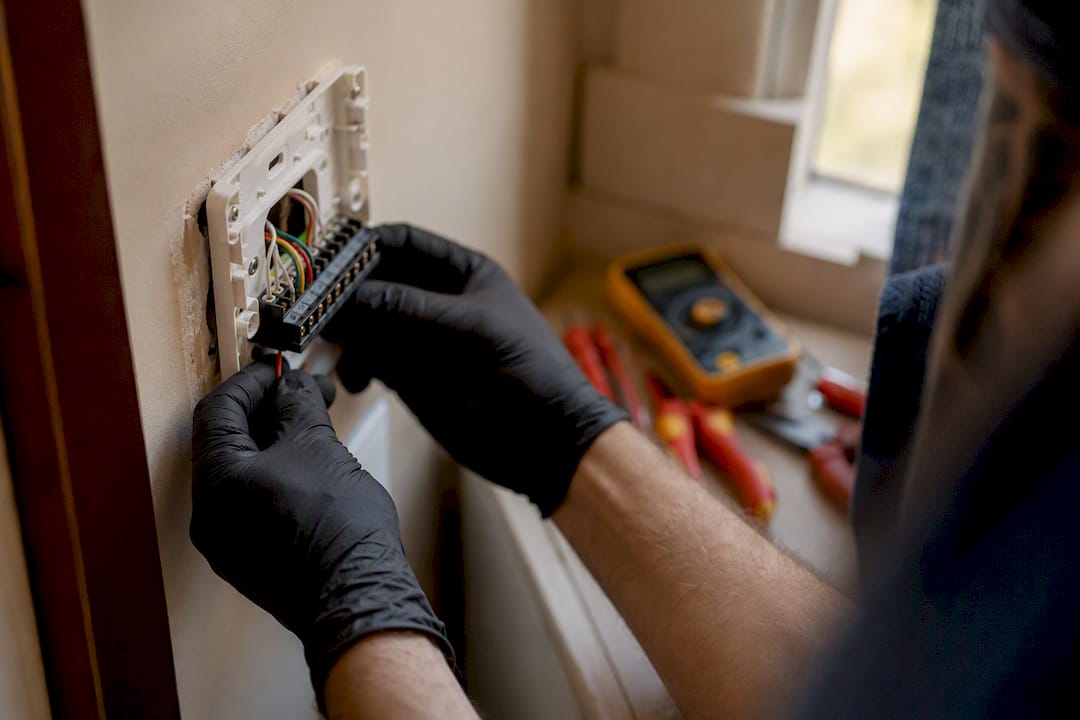
Stop here and call a technician if you see exposed copper, melted or discolored insulation, corroded terminals, or a breaker that trips more than once. A blown low-voltage fuse on the furnace control board can also cut power to the thermostat even when your home’s main electrical panel looks completely normal, and replacing that fuse safely means opening the furnace cabinet, which is technician territory.
Fixing Smart Thermostat Connection and Firmware Problems
Smart thermostats add a layer that older dial and slide units never had to deal with: software. When a Nest, Ecobee, or similar device stops responding, the fix is often closer to restarting a router than repairing a furnace.
Try a soft restart first. Most smart thermostats have a restart option buried in settings, or you can pull it off the wall plate for 10 seconds and reseat it. This clears temporary glitches without touching your saved schedules.
Save the factory reset for last. A factory reset wipes your schedule, Wi-Fi credentials, and preferences. Google’s Nest support documentation confirms that a soft reboot resolves most transient freezes, so reach for the factory reset only after that fails.
Check your Wi-Fi signal strength at the thermostat’s location. Weak signal near an exterior wall or a thermostat mounted far from the router can cause repeated disconnects that look like a hardware fault.
Check for a cloud or app outage. Occasionally the problem isn’t your hardware at all. It’s the manufacturer’s servers. A quick search for your brand’s status page rules this out fast.
Watch for a blinking red or green light. Many smart thermostats trickle-charge an internal battery through the C-wire. A blinking light during that charging cycle is normal, not a malfunction, and interrupting power at that moment can cause a temporary blank screen.
If the display cycles through a boot logo repeatedly without finishing startup, that’s usually a firmware issue rather than a dead unit. Check the manufacturer’s app or support site before assuming you need a replacement.
HVAC Problems That Look Like a Thermostat Malfunction
Plenty of “thermostat not working” complaints turn out to have nothing to do with the thermostat. The equipment it’s connected to is the actual source of the trouble.
A clogged air filter restricts airflow badly enough that the furnace or air handler can shut itself down mid-cycle, which reads as short cycling or total non-response at the thermostat. ENERGY STAR recommends checking filters monthly and replacing them on the manufacturer’s schedule for exactly this reason.
A tripped condensate float switch is a small safety device that shuts the system down when the drain pan fills with water, which happens more often than most homeowners expect during humid Texas summers.
A blown fuse on the furnace control board cuts 24-volt power to the thermostat, so the thermostat goes dark even though nothing is technically wrong with it.
A tripped outdoor disconnect near the AC condenser can stop cooling entirely while the thermostat display keeps working normally, which throws people off since everything indoors seems fine.
If you hear a click at the thermostat when you call for heat or cool, but the furnace or condenser never starts, that click is your thermostat doing its job correctly. The fault has already moved to the equipment side.
Signs You Should Call a Licensed HVAC Technician
Some situations aren’t worth troubleshooting further on your own, and knowing where that line sits protects both your safety and your equipment.
Exposed, frayed, or scorched wiring anywhere near the thermostat or furnace.
A breaker that trips again immediately after you reset it.
Any smell of burning plastic or ozone.
A gas furnace that won’t ignite, especially paired with any smell of gas.
A blank display that persists after fresh batteries and a confirmed breaker reset.
Per Hvac, homeowners can safely handle batteries, breakers, service switch checks, and filter inspection, but exposed wiring or burning smells mean it’s time to stop and call a licensed technician.
Before that call, jot down your thermostat’s brand and approximate age, when the problem started, every step you’ve already tried, and whether any electrical work happened recently in the house. A technician typically starts by checking voltage at the thermostat, then moves to the control-board fuse, then works through equipment-side diagnostics. Handing over that timeline upfront usually cuts diagnostic time significantly.
Preventing Thermostat Problems Before They Start
A little routine maintenance heads off most of the failures covered above.
Replace thermostat batteries roughly once a year, even if you haven’t gotten a low-battery alert, and keep a spare set of alkaline batteries in a kitchen drawer.
Replace or clean your air filter on the schedule your system’s manufacturer recommends. A dirty filter is one of the fastest routes to a system that short cycles or shuts down entirely.
Never mount a thermostat in direct sunlight, near a supply vent, above a kitchen appliance, or behind a door. ENERGY STAR notes that poor placement causes inaccurate readings and unnecessary cycling, which mimics an actual malfunction.
Keep smart thermostat firmware current and read manufacturer notices when they arrive. Skipped updates are a common, avoidable source of frozen displays.
Pro Tip: Mark your filter and battery changes on your phone calendar. Most “sudden” thermostat failures are really months of skipped maintenance catching up at once.
Why We Diagnose Before We Replace
Texas Comfort Crew starts every thermostat and HVAC call the same way: diagnose first, repair first, replace only when the numbers actually support it. A blank thermostat is rarely the whole story. It’s usually a symptom pointing at a blown control-board fuse, a missing C-wire, or a tripped safety switch buried inside the furnace cabinet.
Those are the fixes homeowners genuinely shouldn’t attempt themselves. Opening a furnace control board, testing 24-volt circuits, or wiring in a C-wire where one never existed all carry real risk to both the homeowner and the equipment if done wrong. We walk you through exactly what we find, what it costs to repair versus replace, and let you make the call with full information.
Get a Thermostat That Actually Works, Not Just a Guess
If you’ve worked through the checklist above and your thermostat is still blank, unresponsive, or controlling the wrong equipment, that’s exactly the point where a diagnostic visit pays for itself instead of another hour of guessing. Texas Comfort Crew handles the parts of thermostat troubleshooting that go past battery swaps: control-board fuse replacement, C-wire installation for older systems, smart thermostat setup and firmware issues, and full HVAC diagnostics when the equipment side is the real problem.
We show up, test voltage at the thermostat and the equipment, and walk you through what’s actually wrong before recommending a fix. Repair comes first whenever it’s the honest answer, not replacement by default. If you’re a repeat headache away from wanting ongoing peace of mind, our membership plans add preventive filter checks and tune-ups that catch these issues before you’re standing in a hot living room. Homeowners in Spring Branch can schedule a visit through our local service page, and anyone else across our coverage area can check availability and book service here.
Where to Find More Official Thermostat Guidance
The Department of Energy’s thermostat page covers the most common causes of failure and general efficiency guidance for any thermostat type. ENERGY STAR’s heating and cooling resources explain proper placement and filter maintenance in more detail. For brand-specific wiring diagrams or error codes, check your manufacturer’s own support pages, such as Honeywell’s troubleshooting guide, Google Nest’s support center, or Trane’s homeowner support articles, which walk through model-specific display icons and reset sequences.
Sources
FAQ
Is there a reset button on a thermostat?
Most modern thermostats don’t have a physical reset button. Instead, you either pull the unit off its base plate for about 10 seconds or use a restart option in the settings menu.
How do I know if my thermostat is broken?
If it’s blank after fresh batteries and a breaker reset, or the display works but the furnace or AC never responds even after waiting through a compressor delay, you’re likely dealing with a wiring or equipment fault rather than a simple settings issue.
Why is my thermostat running but not heating?
The thermostat may be calling for heat correctly while the furnace itself has an issue, such as a clogged filter, a tripped safety switch, or a blown fuse on the control board, all of which block the equipment from actually starting.
How do I reset an unresponsive thermostat?
Start with a soft reset: pull the display off its base for 10 seconds and reseat it, or use the restart option in its menu. Save a full factory reset for last since it erases your saved schedule and Wi-Fi settings.
Recommended
Comments